
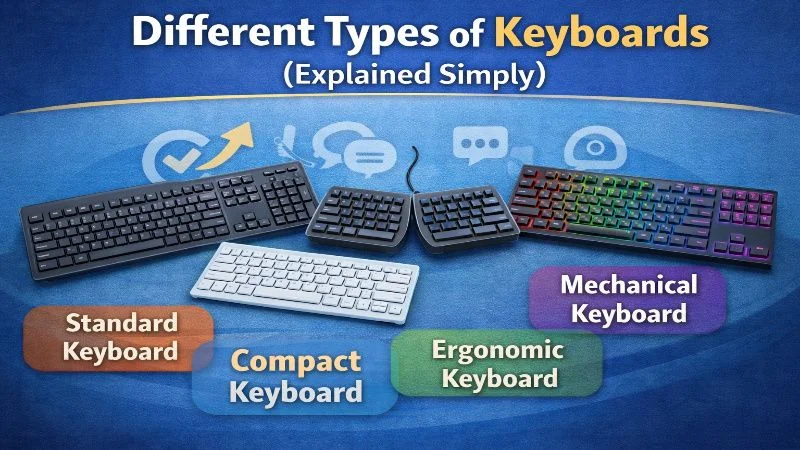
Keyboards are not just mere tools for typing; they are hubs that connect us with our digital world.
With so many types of keyboards available, sometimes the selection of an appropriate keyboard might be confusing. Each of them comes with some distinguishing features and advantages.
They range from mechanical keyboards providing tactile feedback to sleek chiclet designs. Gaming keyboards, on the other hand, sport a load of features to enhance your play.
Knowing the differences will, therefore, help you make an informed choice. Whether it is gaming, work, or casual use, there is a keyboard suited for your needs.
What is a Keyboard and Why is It Important?
Keyboards are computer input devices through which there is interaction with the computer, converting each keystroke into digital signals. This makes them indispensable in everyday computing tasks.
Picking up the right keyboard may further help boost productivity and comfort. Here’s why keyboards matter:
- Allow typing and navigation.
- Offer shortcuts for efficiency.
- Enhance game playing experiences
Knowing the various types further enhances user satisfaction and experience. The right keyboard makes quite a difference in how you work and play.

Mechanical Keyboards
Mechanical keyboards remain one of the most popular due to their strength and accurate strokes. They are filled with individual mechanical switches for each key, providing tactile feedback. They are widely used by gamers and professionals.
That is probably the most attractive feature of a mechanical keyboard, as it has all these customizable options: Different switch types, such as Cherry MX or Razer. All these provide different sound and feel, and you should be able to customize any of these keyboards just the way you would like it.
Some of the benefits of mechanical keyboards include the following.
- Long life-expectancy
- Tactile and audible feedback
- There are several switch types.
The selection of switches can wildly alter the type of experience you will have. They can be satisfying due to their distinct feel and sound. Thus, mechanical keyboards stay at the top of many people’s preferences.

Membrane Keyboards
Membrane keyboards make less noise compared to the mechanical ones. And because of their affordability and lightweight design, they are extensively utilized, especially in offices.
The construction involves pressure pads that create contact when pressed. This construction creates a softer and quieter key stroke. Because they are simple to make, they are generally cheaper.
The advantages of membrane keyboards are:
- Smoother operation
- Affordable
- Lightweight
While they lack the tactile feedback of mechanical keyboards, membrane keyboards are practical for everyday use. Their resistance to spills adds to their appeal, especially in settings prone to accidents.

Gaming Keyboards
The construction of gaming keyboards is to give a fill to your gaming experience. Constructed with advanced technology, these cater to the needs of gamers by emphasizing speed and precision. Most of the time, these types of keyboards are equipped with aesthetic additions, including customizable RGB lighting.
Among its prominent features are programmable keys and anti-ghosting technology, which allows many keys to be pressed at once with no problem. Some models also offer dedicated macro keys to help in quicker execution of complex commands.
Some of the key features in gaming keyboards include:
- RGB lighting
- Programmable keys
- Anti-ghosting technology
These keyboards, for the avid gamer, will give them the responsiveness and personalization they need to become fully immersed in their gaming. Due to their durability in build and specialized functions, they are worth investing in for the serious gamer.

Ergonomic Keyboards
Ergonomic keyboards are designed to make typing easier. They are designed to reduce the strain on hands and wrists to minimize the chance of repetitive strain injuries, which may result from long typing over a period. Most of them are uniquely designed for various purposes.
Many ergonomic models feature a split or curved layout for better positioning of the hands. Some even include adjustable angles that further promote healthy posture when typing.
Key benefits of ergonomic keyboards are:
- Reduced strain on wrists
- Split or arched arrangements
- Adjustable typing angles
Users can enjoy heightened comfort on long typing sessions with the investment in an ergonomic keyboard, thus being a wise choice for frequent typists.

Wireless & Wired Keyboards
It comes down to convenience versus performance, and how badly one needs either, in order to make a choice between wireless and wired keyboards. The wireless keyboard gives a significant amount of freedom in working from a distance with no tangled cords. They work via either Bluetooth or USB receivers and are great for mobile setups.
But wired keyboards offer more reliable connections and speedier response times that are important for gaming and professional applications. They do not require any batteries, which are usually a big concern in the wireless model.
Consider the following factors :
- Wireless: portable, battery-dependent
- Wired: stable, no need of battery.
Which one to choose depends upon whether the emphasis is on mobility or stability.

Chiclet and Low-Profile Keyboards
Chiclet keyboards are characterized by flat keys that have a slight roundness at the edge; the whole design resembles chiclets or pieces of gum. They can be found in many laptops because of their slim profile and light weight. Low-profile keyboards, like chiclets, boast a clean look, visually appealing to minimalists.
Such keyboards are characterized by quiet operation and fast speed of typing. They will suit people who value style and mobility.
Key characteristics include:
- Thin and lightweight
- Keystrokes quietly
- Common in laptops
If you are particular about space and quietness, then chiclet or low-profile keyboards might top your preference list.

Specialty Keyboards Like Programmable, Portable, And More
Specialty keyboards are designed for specific needs and preferences. Programmable keyboards provide for customization, allowing the user to set functions for keys. This makes it useful for developers and also for multimedia editors.
Portable keyboards are compact, foldable keyboards ideal for travelers or those challenged in terms of desk space.
Key features include:
- Programmable keys for custom functions
- Compact and foldable design
- Ideal for niche tasks
These keyboards play specific roles for specialized tasks, which helps to make them much more efficient and convenient.

Keyboard Layouts: QWERTY, Dvorak and Others
Keyboard layout can impact the efficiency and comfort of typing. The QWERTY is pervasive, with other layouts existing as well. Dvorak and Colemak are options that are theoretically designed to improve the typing speed while reducing finger movement.
Different layouts offer:
- QWERTY: Standard and most users will already know this layout.
- Dvorak: Ergonomic, designed to reduce strain
- Colemak: Efficient and keeps most QWERTY familiarity
Choosing the right layout can make a big difference in your typing experience and productivity.

How to Choose the Right Keyboard for You
Make sure you come to the best conclusion on which keyboard to choose for your comfort and productivity. Think about your primary use (gaming, typing, general computing); if you do a lot of typing, consider ergonomics.
Others to consider are:
- Budget: determine your budget How much are you willing to spend?
- Features: Check for backlighting or programmable keys.
- Connectivity: Wireless or wired, whichever your setup selects.
Ultimately, the best keyboard is the one that fits your style, preferences, and needs. Choose wisely to elevate your experience altogether.
Conclusion: (Major take-aways from this section)
In a nutshell, choosing the right keyboard involves knowledge about different types and features. Here’s a quick recap:
- Mechanical keyboards offer tactile feedback.
- Membrane keyboards are quiet and a bit cheaper.
- There are a lot of customizations and lightings on gaming keyboards.
- Ergonomic keyboards enhance comfort.
Choose wisely for better performance.